One clock. Many acts.Um relógio. Muitos atos.
A scene gives a group of elements a shared clock. Acts place each element on that clock, pin holds the stage, and scrub ties it all to the scroll. It is the part of Velora that choreographs, written in markup.Uma cena dá a um grupo de elementos um relógio compartilhado. Os atos colocam cada elemento nesse relógio, o pin segura o palco e o scrub amarra tudo à rolagem. É a parte do Velora que coreografa, escrita em marcação.
Walk through a film set.Caminhe por um set de filmagem.
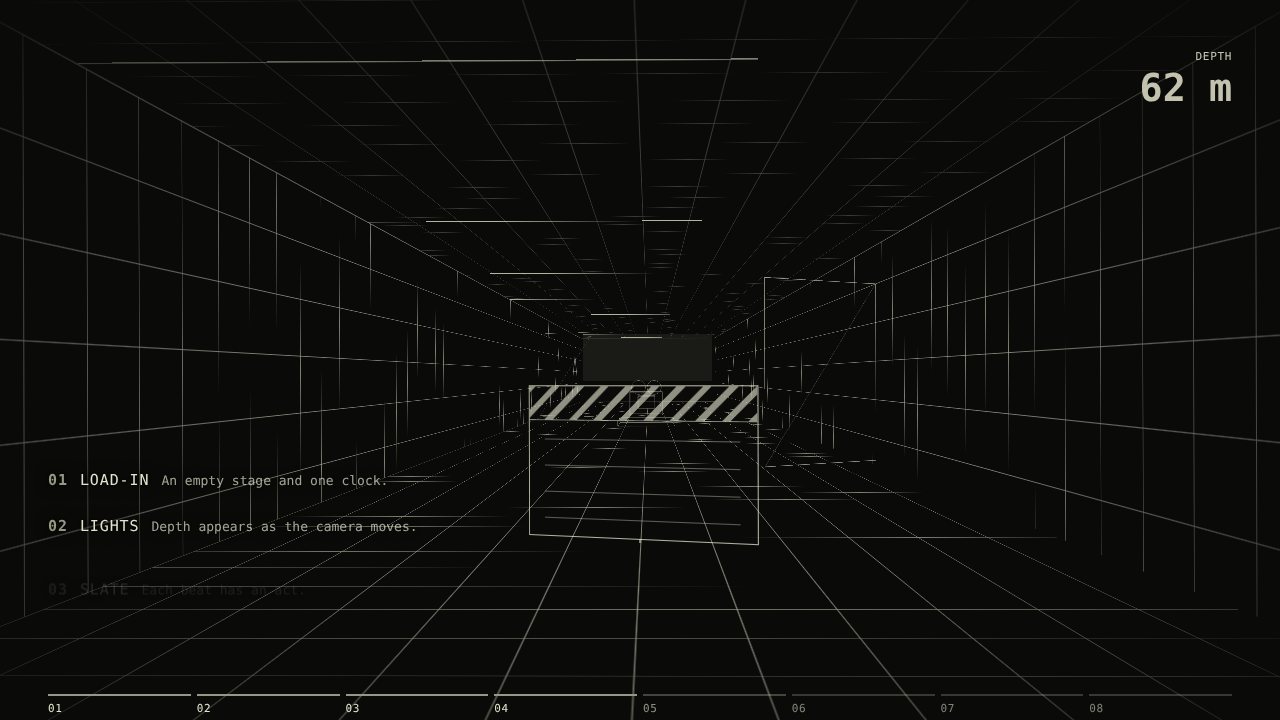
A film camera rolls down a wireframe corridor on a dolly. One attribute, vl-world-path="dolly", sends the set toward the lens, objects exist only near the camera, and vl-lights="on" brings the lights up on the scene clock. The camera enters, leaves, and the last shot holds on the picture. The block is a vl-scene with vl-pin="6". The rail at the bottom is the scene clock, and the five captions sit on it. Beats 1 and 8 play while the stage scrolls in and out, so the pinned part uses beats 2 to 7.Uma câmera de cinema desce por um corredor wireframe sobre um dolly. Um atributo, vl-world-path="dolly", leva o set em direção à lente, os objetos só existem perto da câmera, e vl-lights="on" acende as luzes no relógio da cena. A câmera entra, sai, e o último plano se fixa na imagem. O bloco é um vl-scene com vl-pin="6". O trilho embaixo é o relógio da cena, e as cinco legendas ficam sobre ele. Os tempos 1 e 8 tocam enquanto o palco entra e sai da tela, então a parte fixa usa os tempos 2 a 7.
01Pathvl-world-path="dolly" sends the set toward the lens.01Trajetóriavl-world-path="dolly" leva o set em direção à lente.
02DepthObjects exist only near the camera. Depth appears as you scroll.02ProfundidadeOs objetos só existem perto da câmera. A profundidade aparece conforme você rola.
03DollyThe camera rolls in ahead of the lens; wheels and reels follow the scroll.03DollyA câmera avança diante da lente; rodas e rolos seguem a rolagem.
04ExitThe camera leaves the shot. One clock drives all of it.04SaídaA câmera sai do plano. Um só relógio conduz tudo.
05PictureThe wireframe becomes the frame, and the last shot holds.05ImagemO wireframe vira o quadro, e o último plano se mantém.
CodeCódigo
<section vl-scene vl-timeline="view" vl-pin="6" vl-scrub
         vl-world vl-world-path="dolly" vl-lights="on"
         style="--vl-world-travel:8900; --vl-world-from:9; --vl-world-to:91;
                --vl-lights-from:12; --vl-lights-to:30">
  <div vl-stage>
    <div class="vl-world__stage">
      <div class="vl-world__rig">
        <div vl-plane="free" vl-grid style="--vl-w:…; --vl-h:…; --vl-z:-2400">…</div>
        <div vl-plane="free" vl-solid vl-rest style="--vl-z:-3000">…</div>
      </div>
      <div vl-plane="free" class="camera">…</div>  <!-- outside the rig: always in shot -->
    </div>
    <p vl-enter="fade-up" vl-act="2">Path</p>
    <p vl-enter="fade-up" vl-act="3">Depth</p>
    <p vl-enter="fade-up" vl-act="4">Dolly</p>
  </div>
</section>
Turn all the way around.Dê a volta completa.
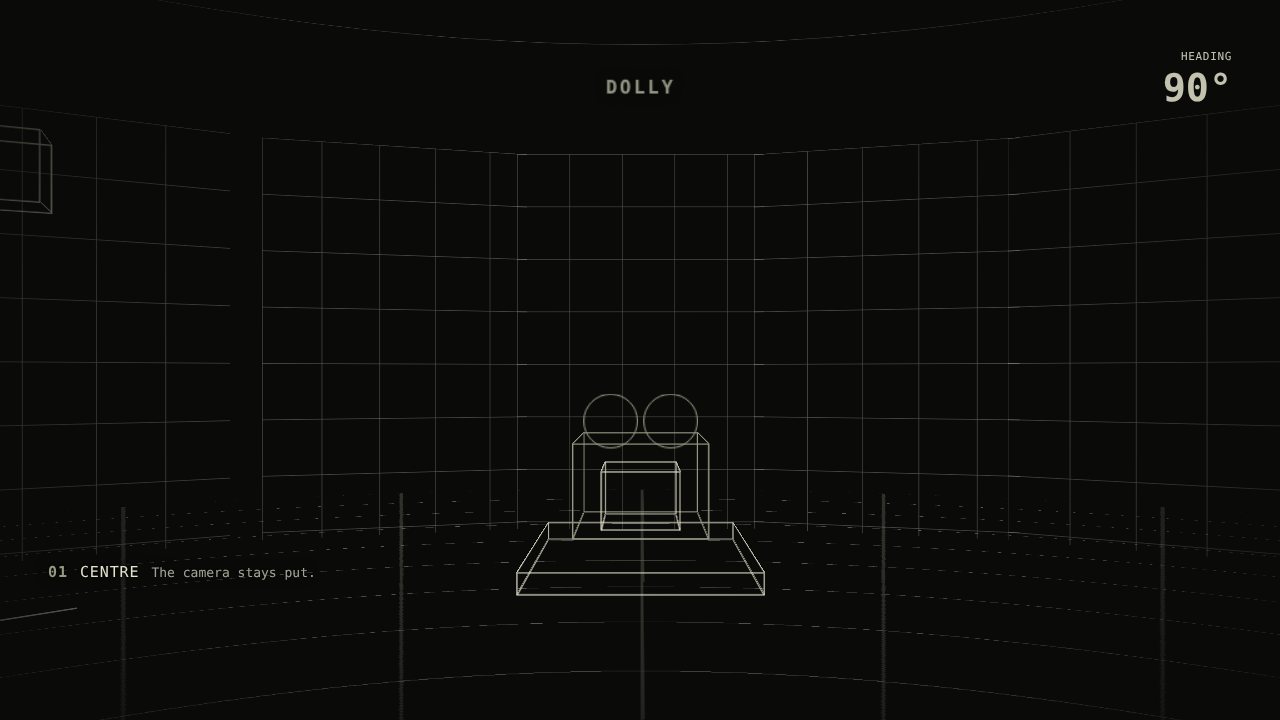
The same clock can turn the camera. The set is a ring and the camera stands on a tripod in the middle. vl-world-path="orbit" turns the set 360 degrees around the lens while you scroll. The lights come up first, the camera leaves before the last shot, and the picture then keeps growing until the stage leaves the viewport.O mesmo relógio pode girar a câmera. O set é um anel e a câmera fica num tripé no meio. vl-world-path="orbit" gira o set 360 graus em torno da lente enquanto você rola. As luzes acendem primeiro, a câmera sai antes do último plano, e a imagem continua crescendo até o palco sair da viewport.
01CentreThe camera stands in the middle of a ring set.01CentroA câmera fica no meio de um set em anel.
02Turnvl-world-path="orbit": the set turns around the lens, reels spin with the scroll.02Girovl-world-path="orbit": o set gira em torno da lente, os rolos giram com a rolagem.
03Last shotThe camera leaves frame; the final shot holds on the screen.03Último planoA câmera sai do quadro; o plano final se mantém na tela.
CodeCódigo
<section vl-scene vl-timeline="view" vl-pin="6" vl-scrub
         vl-world vl-world-path="orbit" vl-lights="on"
         style="--vl-world-from:14.3; --vl-world-to:85.7; --vl-world-pivot:900;
                --vl-lights-from:16; --vl-lights-to:34">
  <div vl-stage>
    <div class="vl-world__stage">
      <div class="vl-world__rig">
        <div vl-plane="free" vl-solid style="--vl-x:1200; --vl-z:900; --vl-heading:90">…</div>
      </div>
      <div vl-plane="free" class="camera">…</div>  <!-- outside the rig: stays in the centre -->
    </div>
    <p vl-enter="fade-up" vl-act="2">Centre</p>
    <p vl-enter="fade-up" vl-act="4" vl-span="2">Turn</p>
    <p vl-enter="fade-up" vl-act="7">Last shot</p>
  </div>
</section>
Place each element on the clock.Coloque cada elemento no relógio.
A scene has eight beats by default. vl-act says which beat an element starts on, and vl-span says how many beats it lasts. Scroll: the four elements on the stage enter on their own beats, and the rail below them is the same clock.Uma cena tem oito tempos por padrão. vl-act diz em qual tempo um elemento começa, e vl-span diz por quantos tempos ele dura. Role: os quatro elementos do palco entram nos seus próprios tempos, e o trilho abaixo deles é o mesmo relógio.
Every element gets a beat.Cada elemento recebe um tempo.
One clock runs the whole stage. The act is the beat where an element starts.Um relógio conduz o palco inteiro. O ato é o tempo em que um elemento começa.
 Next: wall timeA seguir: tempo real
<section vl-scene vl-timeline="view"
         vl-pin="5" vl-scrub>
  <div vl-stage>
    <h3 vl-act="1" vl-span="3"
        vl-enter="clip-rise">Every element</h3>
    <p vl-act="2"
       vl-enter="fade-up">One clock</p>
    <img vl-act="4" vl-span="2"
         vl-enter="scale-in" alt="">
    <a vl-act="6" vl-span="3"
       vl-enter="pop-in">Next</a>
  </div>
</section>Channel attributes must sit on direct children of vl-stage. A wrapper in between skips the act.Atributos de canal precisam ficar em filhos diretos de vl-stage. Um wrapper no meio faz o ato ser ignorado.
Scroll time or wall time.Tempo de rolagem ou tempo real.
The same acts can run on the scroll or on the clock. vl-timeline="view" scrubs them with the track. vl-timeline="auto" plays them once as a short film, each act delayed by one beat.Os mesmos atos podem rodar na rolagem ou no relógio. vl-timeline="view" os conduz com a trilha. vl-timeline="auto" os toca uma vez como um filme curto, cada ato atrasado em um tempo.
01Intent01Intenção
02Primitive02Primitiva
03Channel03Canal
04Parameter04Parâmetro
05Choreography05Coreografia
06Scene06Cena
07Clock07Relógio
08Browser08Navegador
CodeCódigo
<section vl-scene
         vl-timeline="auto"
         style="--vl-beat:380ms">
  <div vl-stage>
    <span vl-act="1" vl-enter="pop-in">Intent</span>
    <span vl-act="2" vl-enter="pop-in">Primitive</span>
    <span vl-act="3" vl-enter="pop-in">Channel</span>
    <!-- acts 4 to 8 follow the same pattern -->
  </div>
</section>
On a time clock vl-pin and vl-scrub do nothing. vl-range overrides the act range on a scroll clock.Em um relógio de tempo real, vl-pin e vl-scrub não fazem nada. vl-range sobrescreve o intervalo do ato em um relógio de rolagem.
Dots made by the browser.Pontos feitos pelo navegador.
With vl-scroll-markers a scroll-snap row gets generated pagination dots from ::scroll-marker. Browsers without it still show the row, and the arrows come from ::scroll-button.Com vl-scroll-markers, uma linha com scroll-snap ganha pontos de paginação gerados por ::scroll-marker. Navegadores sem isso ainda mostram a linha, e as setas vêm de ::scroll-button.
The scene vocabulary.O vocabulário de cenas.
Every public attribute, grouped by job and not by effect.Todo atributo público, agrupado por função e não por efeito.
- vl-scene
- Marks the track and creates the shared clock.Marca a trilha e cria o relógio compartilhado.
- vl-stage
- The sticky stage inside the track. Animated nodes are its direct children.O palco sticky dentro da trilha. Os nós animados são seus filhos diretos.
- vl-act
- The beat where an element starts. Eight beats by default.O tempo em que um elemento começa. Oito tempos por padrão.
- vl-span
- How many beats the element lasts. Defaults to 1.Por quantos tempos o elemento dura. Padrão: 1.
- vl-pin
- Track height in screens, from 1 to 10, on a scroll clock.Altura da trilha em telas, de 1 a 10, em um relógio de rolagem.
- vl-scrub
- Ties the stage motion to the scroll position.Amarra o movimento do palco à posição de rolagem.
- vl-in-view
- Gates motion outside a pinned stage and replays it on re-entry.Bloqueia o movimento fora de um palco fixo e o repete na reentrada.
- vl-scene-trigger
- Holds scroll-driven children paused until the scene is hovered or focused.Mantém filhos guiados por rolagem pausados até a cena receber hover ou foco.
ChannelsCanais
vl-enter vl-scroll vl-loop-effect vl-hover vl-state vl-exit
TimingTempo
vl-timeline vl-range vl-duration vl-delay vl-speed vl-stagger vl-children
NavigationNavegação
vl-page-transition vl-scene-trigger-zone vl-scroll-markers
The compatibility attributes vl-effect and vl-base remain accepted.Os atributos de compatibilidade vl-effect e vl-base continuam aceitos.